> ## Documentation Index
> Fetch the complete documentation index at: https://docs.hedera.com/llms.txt
> Use this file to discover all available pages before exploring further.

# Transactions and Queries

> An overview of Hedera API transactions and queries

## Transactions

Transactions are requests sent by a client to a node with the expectation that they are submitted to the network for processing into consensus order and subsequent application to state. Each transaction (e.g. `TokenCreateTransaction()`) has an associated transaction fee compensating the Hedera network for processing and subsequent maintenance in a consensus state.

**Transaction ID**

Each transaction has a unique transaction ID. The transaction ID is used for the following:

* Obtaining receipts, records
* Internally by the network for detecting when duplicate transactions are submitted

The transaction ID is composed by using the transaction's valid start time and the account ID of the account that is paying for the transaction. The transaction's valid start time is the time the transaction begins to be processed on the network. The transaction's valid start time can be set to a future date/time. A transaction ID looks something like `0.0.9401@1598924675.82525000`where `0.0.9401` is the transaction fee payer account ID and `1598924675.82525000` is the timestamp in `seconds.nanoseconds`.

Transactions have a valid duration of up to 180 seconds and begin at the transaction's valid start time. This means that the transaction has up to 180 seconds to be accepted by one of the nodes in the network. If the transaction is not accepted in this timeframe, the transaction will expire. The transaction will have to be created, signed, and submitted again.

A **transaction** generally includes the following:

* **Node Account**: the account ID of the node the transaction is being sent to (e.g. `0.0.3`)
* **Transaction ID**: the identifier for a transaction. It has two components:
  * The account ID of the paying account
  * The transaction’s valid start time
* **Transaction Fee**: the maximum fee the transaction fee paying account is willing to pay for the transaction
* **Valid Duration**: the number of seconds that the client wishes the transaction to be deemed valid for, starting at the transaction's valid start time
* **Memo**: a string of text up to 100 bytes of data (optional)
* **Transaction**: type of request, for instance, an HBAR transfer or a smart contract call
* **Signatures**: at minimum, the paying account will sign the transaction as authorization. Other signatures may be present as well.

For a detailed breakdown of all transaction properties, please refer to the [Transaction Properties](/learn/core-concepts/transactions/properties) page.

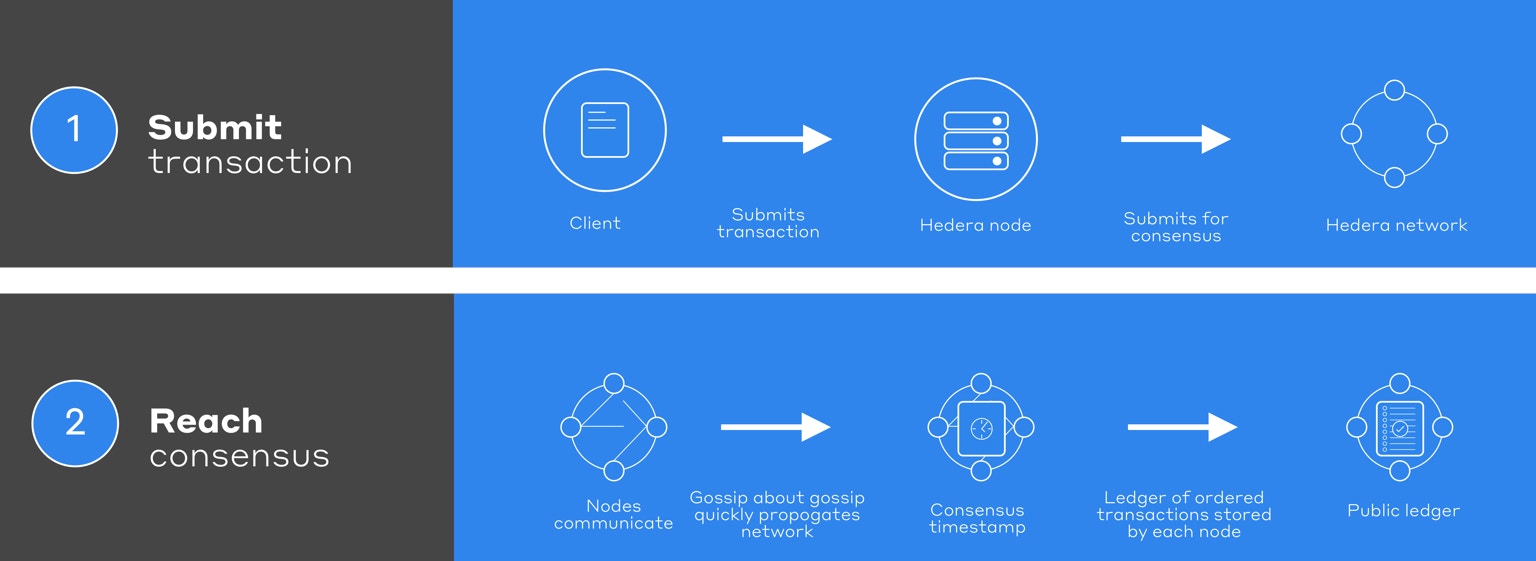
The lifecycle of a transaction in the Hedera ecosystem begins when a client creates a transaction. Once the transaction is created it is cryptographically signed at a minimum by the account paying for the fees associated with the transaction. Additional signatures may be required depending on the properties set for the account, topic, or token. The client can stipulate the maximum fee it is willing to pay for the processing of the transaction and, for a smart contract operation, the maximum amount of gas. Once the required signatures are applied to the transaction the client then submits the transaction to any node on the Hedera network.

The receiving node validates (for instance, confirms the paying account has sufficient balance to pay the fee) the transaction and, if validation is successful, submits the transaction to the Hedera network for consensus by adding the transaction to an event and gossiping that event to another node. Quickly, that event flows out to all the other nodes. The network receives this transaction exponentially fast via the [gossip about gossip protocol](/learn/core-concepts/hashgraph/gossip-about-gossip). The consensus timestamp for an event (and so the transactions within) is calculated by each node independently calculating the median of the times that the network nodes received that event. You may find more information on how the consensus timestamp is calculated [here](https://docs.hedera.com/docs/hashgraph-overview#section-fair-timestamps). The hashgraph algorithm delivers the finality of consensus. Once assigned a consensus timestamp the transaction is then applied to the consensus state in the order determined by each transaction’s consensus timestamp. At that point, the transaction fees are also processed. In this manner, every node in the network maintains a consensus state because they all apply the same transactions in the same order. Each node also creates and temporarily stores receipts/records in support of the client, subsequently querying for the status of a transaction.

## Transaction Fees

Every transaction on the Hedera network has an associated fee to compensate the network for processing and state storage. With the implementation of **[HIP-1259](https://hips.hedera.com/hip/hip-1259)**, the mechanism for handling these fees has been significantly streamlined to improve network efficiency and simplify transaction records for users.

<Note>
  **Variable-rate pricing for high-volume transactions.** Entity creation transactions
  (such as `CryptoCreate`, `TokenCreate`, and `TokenMint`) that set the `high_volume`
  flag use a separate throttle pool with **variable-rate pricing** — fees scale with
  current utilization of the high-volume capacity. See the
  [High-Volume Entity Creation](/learn/core-concepts/high-volume-entity-creation)
  guide for details on how this affects your costs.
</Note>

### Fee Collection and Distribution ([HIP-1259](https://hips.hedera.com/hip/hip-1259))

Previously, transaction fees were immediately split and distributed to multiple accounts with every transaction. This immediate distribution created challenges. For a simple crypto transfer between two accounts, the system must read and update up to six accounts: the sender, receiver, submitting node, `0.0.98`, `0.0.800`, and `0.0.801`. This increases processing overhead and slows performance. In the [block stream](/support/glossary#block-stream), every transaction must record balance changes for all these accounts, inflating data size and storage costs. Users viewing transactions on explorers like HashScan see a complex web of transfers, which can be confusing even with visualizations.

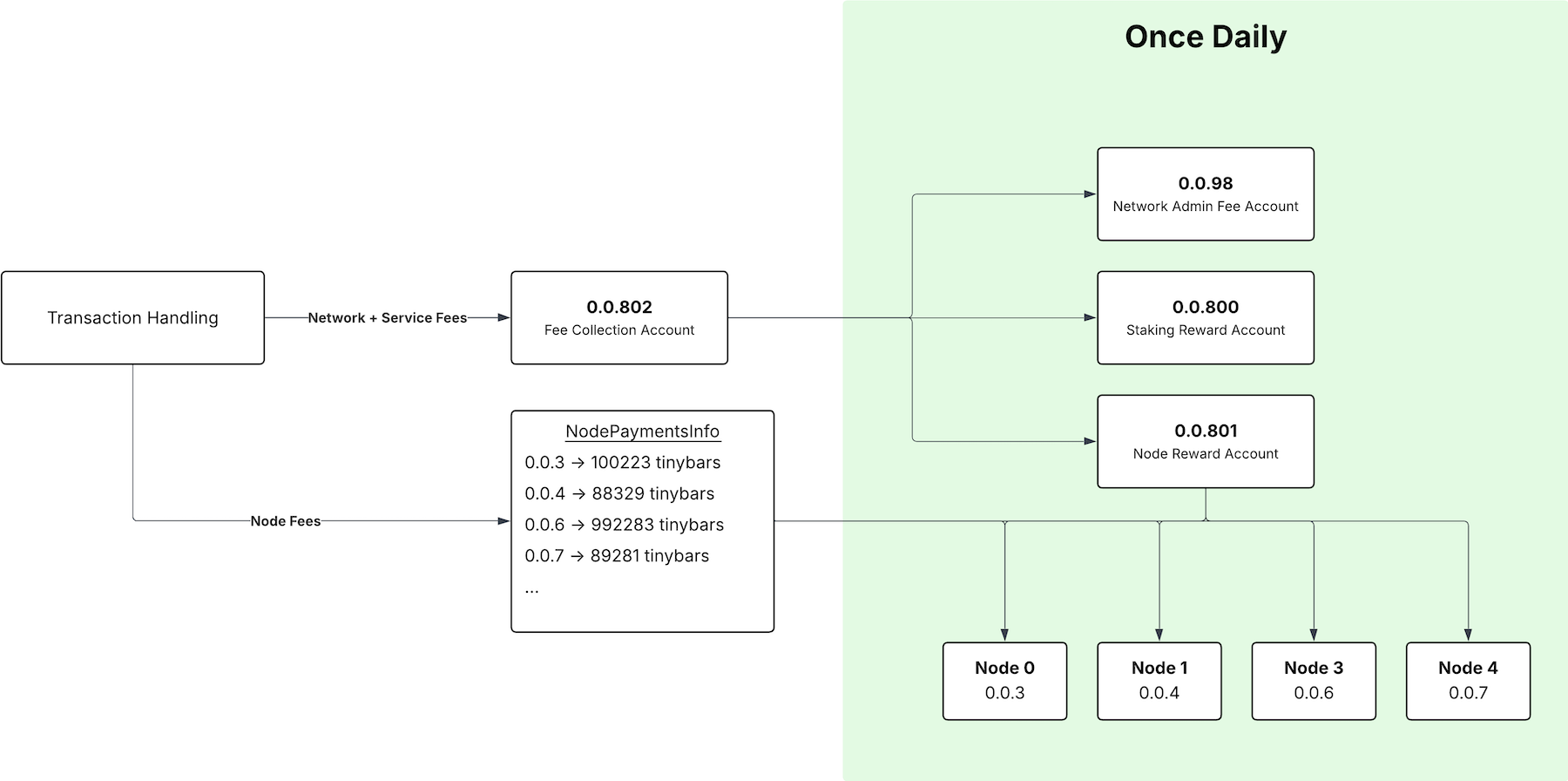
The new system introduces the **Fee Collection Account (`0.0.802`)**, a network-controlled account that consolidates all transaction fees.

**How it Works:**

1. **Collection**: When a transaction is processed, the entire fee is transferred in a single payment to the Fee Collection Account (`0.0.802`).
2. **Distribution**: Once per day, at the end of each staking period, a single, large synthetic transaction distributes the accumulated fees from the `0.0.802` account to the appropriate destinations.

<Info>
  #### **Key Takeaway**

  This enhancement **does not change the amount you pay** for transactions. It only optimizes how the network processes the fees behind the scenes, resulting in a cleaner experience for users and a more efficient network for everyone.
</Info>

These destinations include:

* **Node Operator Rewards**: Payments to individual nodes for their services.
* **Staking Rewards (`0.0.800`)**: Funds allocated to accounts participating in staking.
* **Node Rewards (`0.0.801`)**: Rewards distributed to nodes.
* **Network Treasury (`0.0.98`)**: The account that receives network fees.

<Frame>
  <img src="https://mintcdn.com/hedera-0c6e0218/56qFLublUl4hEHRL/images/core-concepts/transactions-and-queries/fee-collection-account-flow.png?fit=max&auto=format&n=56qFLublUl4hEHRL&q=85&s=1b8346cbd63d6057945494089bf279f8" width="1800" height="896" data-path="images/core-concepts/transactions-and-queries/fee-collection-account-flow.png" />
</Frame>

### Example 1: Fee Collection in Action (Crypto Transfer)

Let's look at a standard `CRYPTO TRANSFER` transaction to see how the fee is collected.

**Transaction Link:** [https://hashscan.io/mainnet/transaction/1771485699.125401461](https://hashscan.io/mainnet/transaction/1771485699.125401461)

In this transaction, account `0.0.10231006` sends a small amount of HBAR to `0.0.37`. The HBAR transfers clearly show the fee consolidation:

| Account        | Amount           | Description                 |
| :------------- | :--------------- | :-------------------------- |
| `0.0.10231006` | **-0.00102456ℏ** | Payer (Sent transfer + fee) |
| `0.0.37`       | **+0.00000009ℏ** | Receiver (Node 34)          |
| **`0.0.802`**  | **+0.00102447ℏ** | **Fee Collection Account**  |

### Example 2: Fee Collection Across All Transaction Types

The HIP-1259 fee collection mechanism applies to all transaction types, not just crypto transfers. Let's look at a `SUBMIT MESSAGE` transaction to see the same streamlined process.

**Transaction Link:** [https://hashscan.io/mainnet/transaction/1771486013.122401000](https://hashscan.io/mainnet/transaction/1771486013.122401000)

#### Transaction Details

* **ID:** `0.0.85243@1771485974.183471116`
* **Type:** `SUBMIT MESSAGE`
* **Fee:** `0.00902194ℏ`

#### HBAR Transfers Breakdown

This transaction submitted a message to the Hedera Consensus Service. Notice how simple the HBAR transfers are:

| Account       | Amount           | Description                      |
| :------------ | :--------------- | :------------------------------- |
| `0.0.85243`   | **-0.00902194ℏ** | Payer (Paid the transaction fee) |
| **`0.0.802`** | **+0.00902194ℏ** | **Fee Collection Account**       |

That's it. The entire fee is cleanly transferred to account `0.0.802`. There are no other transfers related to the fee in this transaction, making the record simple and easy to understand.

### Before vs. After HIP-1259

| Aspect                 | Before HIP-1259                                          | After HIP-1259                                                        |
| :--------------------- | :------------------------------------------------------- | :-------------------------------------------------------------------- |
| **Fee Distribution**   | Immediate, per-transaction splits to multiple accounts.  | Consolidated into a single account (`0.0.802`) and distributed daily. |
| **Transaction Record** | Shows multiple fee-related transfers.                    | Shows a single, clear fee transfer to `0.0.802`.                      |
| **Network Overhead**   | Higher, due to multiple balance updates per transaction. | Lower, improving overall network throughput.                          |
| **Block Stream**       | Larger and more complex.                                 | Smaller and more efficient, reducing costs for mirror nodes.          |

## Transaction Types

### Standard Transactions

Standard transactions are individual operations submitted to the network, such as token transfers, account creation, or smart contract calls. Each transaction contains a specific operation type that determines its behavior and the changes it makes to the network state.

* **Standard Transaction ID Format**
  * The transaction ID uniquely identifies a transaction on the Hedera network. It consists of the payer’s account ID and the transaction’s valid start time, formatted as:
    `accountID@validStartTime`\
    This ID is used for obtaining receipts and records and for detecting duplicate transactions within the network.

**Transaction ID Example**

`0.0.9401@1598924675.82525000` → A transaction paid for by account `0.0.9401` with a valid start time of `1598924675.82525000`.

### Batch Transactions ([HIP-551](https://hips.hedera.com/hip/hip-551))
<Info>
  #### **Note**

  Jumbo EthereumTransaction ([HIP-1086](https://hips.hedera.com/hip/hip-1086)) supports large `callData` directly in `ethereumData` but can’t be included in batch transactions. For limits and details, see the [EthereumTransaction SDK documentation](/native/smart-contracts/ethereum-transaction#handling-large-calldata-payloads).

  📣 For detailed gas cost calculation of jumbo Ethereum transactions, refer to the [Gas and Fees page](/evm/development/gas-fees#gas-schedule-and-fee-calculation).
</Info>

Batch transactions allow multiple operations (HAPI calls) to be executed atomically as a single network transaction, ensuring that all operations either succeed together or fail together (upholding ACID properties).

#### **Outer Batch Transaction ID**

* This is the container transaction that follows the standard transaction ID format (`accountID@validStartTime`).
* It uniquely identifies the entire batch and is used for deduplication of the batch as a whole.
* The fee for the batch is paid by the account that submits the outer transaction.

***Example:*** **`0.0.9401@1598924675.82525000`**

#### **Inner Transaction IDs**

* Each inner transaction has its own transaction ID, following the same format as standard transactions.
* These IDs are associated with the specific operations within the batch.
* Upon processing, each inner transaction record includes a `parentConsensusTimestamp` field, which links it to the consensus timestamp of the outer batch transaction. This linkage preserves the atomicity of the batch by ensuring all inner transactions are tied to the same consensus event.
* Methods such as `getInnerTransactionIds()` can be used to retrieve the inner transaction IDs after execution.

#### **Batch Key**

To prevent tampering—such as reordering, removing, or adding transactions within the batch a Batch Key is used.

* **Purpose:**
  * The Batch Key signals the trusted signer who is authorized to finalize the batch.
  * It ensures that the inner transactions are submitted as a complete, unaltered set.
* **Mechanism:**
  * Each inner transaction must include the Batch Key in its signature map.
  * During consensus, the network verifies that every inner transaction carries a valid and consistent Batch Key.
  * If any inner transaction is missing a valid Batch Key signature or if inconsistencies are detected, the entire batch is rejected.

<Info>
  #### **Note:**

  The outer batch transaction does not include the Batch Key; its role is solely to encapsulate the inner transactions and manage deduplication.
</Info>

#### **Overall Batch Transaction Processing**

* The batch transaction is processed as a single atomic unit with a consolidated response and receipt.
* Despite the atomic processing, each inner transaction is recorded individually, allowing for detailed auditing and troubleshooting if necessary.
* The design of batch transactions minimizes network overhead and ensures that all related operations are executed in lockstep, thereby maintaining the integrity and consistency of the network state.

**Reference**: [HIP-551](https://hips.hedera.com/hip/hip-551), [HIP-1086](https://hips.hedera.com/hip/hip-1086)

### Nested Transactions

A **nested transaction** triggers subsequent transactions after executing a top-level transaction. The top-level transaction that a user submits is a **parent transaction**. For each subsequent transaction, the parent transaction triggers a **child transaction** as a result of the execution of the parent transaction. An example of a nested transaction is when a user submits the top-level transfer transaction to an account alias that triggers an account creation transaction behind the scenes. This parent/child transaction relationship is also observed with Hedera contracts interacting with HTS precompile. A parent transaction supports up to 999 child transactions since the platform reserves 1000 nanoseconds per user-submitted transaction.

**Transaction IDs**

Parent and child transactions share the payer account ID and transaction valid start timestamp. The child transaction IDs have an additional **nonce** value representing the order in which the child transactions were executed. The parent transaction has a nonce value of 0. The nonce value of child transactions increments by 1 for each child transaction executed due to the parent transaction.

Parent Transaction ID: payerAccountId\@transactionValidStart

Child Transaction ID: payerAccountId\@transactionValidStart/nonce

Example:

* Parent Transaction ID: 0.0.2252\@1640119571.329880313
* Child 1 Transaction ID: 0.0.2252\@1640119571.329880313/1
* Child 2 Transaction ID: 0.0.2252\@1640119571.329880313/2

**Transaction Records**

Nested transaction records are returned by requesting the record for the parent transaction and setting the `setIncludeChildren(<value>)` to true. This returns records for all child transactions associated with the parent transaction. Child transaction records include the parent consensus timestamp and the child transaction ID.

The parent consensus timestamp field in a child transaction record is not populated when the child transaction was triggered **before** the parent transaction. An example of this case is creating an account using an account alias. The user submits the transfer transaction to create and fund the new account using the account alias. The transfer transaction (parent) triggers the account create transaction (child). However, the child transaction occurs before the parent transaction, so the new account is created before completing the transfer. The parent consensus timestamp is not populated in this case.

**Transaction Receipts**

Nested transaction receipts can be returned by requesting the parent transaction receipt and setting the boolean value equal to true to return all child transaction receipts.

**Child Transaction Fees**

The transaction fee for the child transaction is included in the record of the parent transaction. The transaction fee will return zero in the child transaction.

## Queries

**Queries** are processed only by the single node to which they are sent. Clients send queries to retrieve some aspect of the current consensus state, like an account balance. Certain queries are free, but generally, they are subject to fees. The full list of queries can be found [here](/native/queries).

<Info>
  Under the [Fee Model](/learn/core-concepts/fee-model), queries can have node, network, and service fee components. However, many common queries (e.g., `TransactionGetReceipt`, `CryptoGetAccountBalance`) are marked as **free** in the fee schedule. For non-free queries, the SDK creates a payment transaction to cover the fees.
</Info>

A query includes a header that includes a normal HBAR transfer transaction that will serve as how the client pays the node the appropriate fee. There is no way to give partial payment to a node for processing the query, meaning if a user overpaid for the query, the user will not receive a refund. The node processing the query will submit that payment transaction to the network for processing into a consensus statement to receive its fee.

A client can determine the appropriate fee for a query by asking a node for the cost, not the actual data. Such a `COST_ANSWER` query is free to the client.

For more information about query fees, please visit Hedera API fees [overview](https://www.hedera.com/fees).

<Info>
  #### Recall

  Hedera does not have **miners** or a special group of nodes responsible for adding transactions to the ledger like alternative distributed ledger solutions. Each node's influence on determining the consensus timestamp for an event is proportional to its stake in HBAR.
</Info>

<Frame>
  <img src="https://mintcdn.com/hedera-0c6e0218/h9jV0CleNbqsy3H_/images/core-concepts/transactions-and-queries/transactions-and-queries-1.avif?fit=max&auto=format&n=h9jV0CleNbqsy3H_&q=85&s=5355f6fecc34dbeb134816258701cd94" width="1536" height="561" data-path="images/core-concepts/transactions-and-queries/transactions-and-queries-1.avif" />
</Frame>

Once a transaction has been submitted to the network, clients may seek confirmation that it was successfully processed. Multiple confirmation methods are available, varying in the level of information provided, the duration for which the confirmation is available, the degree of trust, and the corresponding cost.

<Frame>
  <img src="https://mintcdn.com/hedera-0c6e0218/h9jV0CleNbqsy3H_/images/core-concepts/transactions-and-queries/transactions-and-queries-2.avif?fit=max&auto=format&n=h9jV0CleNbqsy3H_&q=85&s=3584645e8bea65c23f2a165be268a118" width="1200" height="209" data-path="images/core-concepts/transactions-and-queries/transactions-and-queries-2.avif" />
</Frame>

### Confirmations

* **Receipts:** Receipts provide minimal information - simply whether or not the transaction was successfully processed into a consensus state. Receipts are generated by default and are persisted for 3 minutes. Receipts are free.
* **Records:** Records provide greater detail about the transaction than do receipts — such as the consensus timestamp it received or the results of a smart contract function call. Records are generated by default but are persisted for 3 minutes.
* **State proofs (coming soon):** When querying for a record, a client can optionally indicate that it desires the network to return a state proof in addition to the record. A state-proof documents network consensus on the contents of that record in the consensus state — this collective assertion includes signatures of most of the network nodes. Because state proofs are cryptographically signed by a supermajority of the network, they are secure and potentially admissible in a court of law.

<Card title="Rest API" href="/reference/rest-api" />

For a more detailed review of the confirmation methods, please check out this [blog post](https://www.hedera.com/blog/transaction-confirmation-methods-in-hedera).

## FAQs

<AccordionGroup>
  <Accordion title="What are the transaction and query fees associated with using Hedera?">
    You can refer to the fees page on Hedera's website for a detailed breakdown of transaction and query costs. If you're looking for an estimation tool, you can use the [Hedera fee estimator](https://hedera.com/fees).
  </Accordion>

  <Accordion title="What are transactions?">
    Transactions are requests sent by a client to a node with the expectation that they are submitted to the network for processing into consensus order and subsequent application to state. Each transaction has a unique transaction ID composed of the transaction's valid start time and the account ID of the account that is paying for the transaction. This ID is used for obtaining receipts, records, and state proofs and for detecting when duplicate transactions are submitted.
  </Accordion>

  <Accordion title="What are queries?">
    Queries are requests processed only by the single node to which they are sent. [Clients](/support/glossary#client) send queries to retrieve some aspect of the current consensus state, like the balance of an account. Certain queries are free, but generally, queries are subject to fees.
  </Accordion>

  <Accordion title="What is the difference between receipts and records?">
    Receipts provide minimal information - whether or not the transaction was successfully processed into a consensus state. Records provide greater detail about the transaction than receipts, such as the consensus timestamp it received or the results of a smart contract function call.
  </Accordion>

  <Accordion title="What is the batch transaction size limit?">
    The batch transaction size limits are:

    * **Number of transactions**: The maximum number of transactions in a batch is limited to 50 inner transactions.
    * **Total size**: The maximum size of the batch transaction must not exceed 6KB, including all inner transactions.
    * **Time constraint**: All inner transactions must execute within the standard transaction valid duration (typically 3 minutes).

    These limits are designed to ensure that batch transactions can be processed efficiently by the network while still providing enough capacity for complex transaction flows. The 50-transaction limit and 6KB size limit help prevent network congestion, while the time constraint ensures that all operations complete within a reasonable timeframe.
  </Accordion>

  <Accordion title="What are batch transactions and why should I use them?">
    Batch transactions allow multiple operations to be executed atomically in a single network transaction. All operations either succeed together or fail together, providing ACID properties (Atomicity, Consistency, Isolation, and Durability).

    You should use batch transactions when:

    * You need to ensure multiple operations succeed or fail as a unit
    * You want to reduce the complexity of managing multiple separate transactions
    * You need to perform operations that logically belong together (like unfreezing an account, transferring tokens, and freezing it again)
    * You want to reduce overall transaction fees compared to submitting multiple individual transactions
  </Accordion>

  <Accordion title="How are fees handled in batch transactions?">
    Batch transactions have a specific fee structure:

    * The outer batch transaction has its own fee (node + network), paid by the batch transaction's payer
    * Each inner transaction pays its own fee (node + network + service), paid by each inner transaction's payer
    * Inner transactions are charged even if the batch fails
    * The total cost will typically be less than submitting each transaction individually

    This means different accounts can pay for different parts of the batch, allowing for flexible payment arrangements.
  </Accordion>

  <Accordion title="What is a BatchKey and why is it required?">
    A `BatchKey` is a key that must sign the outer batch transaction and is set on each inner transaction. It serves several critical purposes:

    * **Security**: Ensures that batch transactions can only be submitted as a whole and prevents tampering with the batch
    * **Authorization**: Signals the trusted entity who can finalize the batch
    * **Integrity**: Guarantees that the inner transactions haven't been modified after being prepared for the batch

    Every inner transaction must have a `BatchKey` set, and the outer batch transaction must be signed by all BatchKeys specified in the inner transactions.
  </Accordion>

  <Accordion title="How do I properly prepare transactions for a batch?">
    The **recommended way** to prepare transactions for a batch is to use the `batchify()` method:

    ```javascript theme={null}
    // JavaScript example
    const tx = new TransferTransaction()
        .addHbarTransfer(sender, -10)
        .addHbarTransfer(recipient, 10)
        .batchify(client, batchPublicKey);
    ```

    This method automatically:

    1. Sets the batch key on the transaction
    2. Sets the node account ID to 0.0.0 (required for inner transactions)
    3. Freezes the transaction with the provided client
    4. Signs the transaction with the client's operator key

    The **manual approach** requires multiple steps:

    ```javascript theme={null}
    // Manual approach - requires multiple steps
    const transferTx = new TransferTransaction()
        .addHbarTransfer(sender, -10)
        .addHbarTransfer(recipient, 10)
        .setBatchKey(batchPublicKey)  // Step 1: Set batch key
        .freezeWith(client)           // Step 2: Freeze with client (sets nodeAccountId to 0.0.0)
        .sign(operatorKey);           // Step 3: Sign with operator key
    ```

    Learn more [here](/native/transactions/batch).
  </Accordion>

  <Accordion title="What are the most common errors with batch transactions and how do I fix them?">
    <table><thead><tr><th>Error</th><th>Code</th><th>Cause</th><th>Solution</th></tr></thead><tbody><tr><td><code>BATCH\_LIST\_EMPTY</code></td><td>388</td><td>Submitting a batch with no inner transactions</td><td>Add at least one inner transaction to the batch</td></tr><tr><td><code>BATCH\_LIST\_CONTAINS\_DUPLICATES</code></td><td>389</td><td>The batch contains duplicate inner transactions</td><td>Ensure each inner transaction in the batch is unique</td></tr><tr><td><code>BATCH\_TRANSACTION\_IN\_BLACKLIST</code></td><td>390</td><td>An inner transaction is of a type that's not allowed in batches</td><td>Only use allowed transaction types in batches</td></tr><tr><td><code>INNER\_TRANSACTION\_FAILED</code></td><td>391</td><td>One or more inner transactions failed during execution</td><td>Check the specific error for the inner transaction and fix the issue</td></tr><tr><td><code>BATCH\_KEY\_SET\_ON\_NON\_INNER\_TRANSACTION</code></td><td>393</td><td>`BatchKey` is set on the outer transaction</td><td>Only set BatchKey on inner transactions, not on the outer batch transaction</td></tr><tr><td><code>INVALID\_BATCH\_KEY</code></td><td>394</td><td>The `BatchKey` is missing or invalid</td><td>Ensure all inner transactions have a valid `BatchKey` set</td></tr><tr><td><code>INVALID\_NODE\_ACCOUNT\_ID</code></td><td>341</td><td>Inner transaction has a nodeAccountID other than 0.0.0</td><td>Use the <code>batchify()</code> method which automatically sets nodeAccountID to 0.0.0</td></tr></tbody></table>
  </Accordion>
</AccordionGroup>

> #### HIP-1259 FAQs
>
> <AccordionGroup>
>   <Accordion title="Why do I see transaction fees going to account 0.0.802?">
>     This is part of a network enhancement called HIP-1259, which introduced the **Fee Collection Account (0.0.802)**. Instead of splitting fees across multiple accounts with every transaction, all fees are now sent to this single, network-controlled account. This simplifies transaction records and improves network performance.
>   </Accordion>
>
>   <Accordion title="When are staking rewards distributed?">
>     Staking rewards are distributed to individual stakers at the end of each 24-hour staking period. The funds for these rewards are moved into the staking rewards account (`0.0.800`) once per day at the **beginning** of the staking period from the Fee Collection Account (`0.0.802`).
>   </Accordion>
>
>   <Accordion title="Can I send HBAR to account 0.0.802?">
>     No. The Fee Collection Account (`0.0.802`) is a special, network-controlled account that **does not accept HBAR deposits** from users. It has no keys and is designed to only receive network fees. Any direct transfer attempts will be rejected.
>   </Accordion>
>
>   <Accordion title="Does HIP-1259 change how much I pay for transactions?">
>     No. This enhancement **does not change the amount you pay** for transactions. It only optimizes how the network processes fees behind the scenes. The cost of transactions remains the same.
>   </Accordion>
>
>   <Accordion title="What is the daily synthetic transaction?">
>     The daily synthetic transaction is a single, large, network-generated transaction that occurs once per day at the start of each staking period. It distributes all the fees accumulated in the Fee Collection Account (`0.0.802`) to their final destinations, including the staking rewards account (`0.0.800`), node reward account (`0.0.801`), and the network treasury (`0.0.98`).
>   </Accordion>
> </AccordionGroup>
