> ## Documentation Index
> Fetch the complete documentation index at: https://docs.hedera.com/llms.txt
> Use this file to discover all available pages before exploring further.
# Deploy Smart Contracts on Hedera Using Truffle
The [Hedera JSON RPC Relay](/evm/development/json-rpc) enables developers to use their favorite EVM-compatible tools such as Truffle, Hardhat, Web3JS, EthersJS, to deploy and interact with smart contracts on the Hedera network. As highlighted in a [previous article](https://hedera.com/blog/anything-you-can-do-you-can-do-on-hedera-introducing-the-json-rpc-relay), the relay provides applications and tools seamless access to Hedera while masking implementation complexities and preventing reductions in performance, security, and scalability.
This tutorial shows you how to deploy smart contracts on Hedera using Truffle and the [JSON RPC Relay](/evm/development/json-rpc) with the following steps:
1. Create an account that has ECDSA keys using the Javascript SDK
2. Compile a contract using Truffle
3. Deploy the smart contract to Hedera network through the JSON RPC Relay
You can find more examples using Truffle, Web3JS, and Hardhat in [this GitHub repository](https://github.com/hashgraph/hedera-json-rpc-relay/tree/main/tools).
***
## Prerequisites
* Get a[ ](https://portal.hedera.com/register)[Hedera testnet account](https://portal.hedera.com/register)
* This[ Codesandbox](https://codesandbox.io/s/hedera-example-json-rpc-truffle-q6kibt?file=/create-account.js) is already setup for you to try this example
* Fork the sandbox
* Remember to provide your testnet account credentials for the ***operator*** in the ***.env*** file
* Open a new terminal and run:
* ***npm install -g truffle*** (this installation may take a few minutes)
* ***node create-account.js***
* Get[ ](https://github.com/ed-marquez/hedera-example-staking)[the example code from GitHub](https://github.com/ed-marquez/hedera-example-json-rpc-truffle)
***
## Table of Contents
1. [Create an ECDSA Account](#create-an-account-that-has-ecdsa-keys)
2. [Compile Smart Contract](#compile-a-smart-contract-using-truffle)
3. [Deploy Smart Contract](#deploy-the-smart-contract-to-hedera-using-truffle)
4. [Additional Resources](#additional-resources)
***
## Create an Account that Has ECDSA Keys
Hedera supports two popular types of signature algorithms, ED25519 and ECDSA. Both are used in many blockchain platforms, including Bitcoin and Ethereum. **Currently, the JSON RPC Relay only supports Hedera accounts with an alias set (i.e. public address) based on its ECDSA public key.** To deploy a smart contract using Truffle, we first have to create a new account that meets these criteria. The ***main()*** function in ***create-account.js*** helps us do just that.
In case you’re interested in more details about auto account creation and alias, check out the [documentation](/native/accounts/create#create-an-account-via-an-account-alias#create-an-account-via-an-account-alias) and [HIP-32](https://hips.hedera.com/hip/hip-32).
```javascript theme={null}
async function main() {
// Generate ECDSA key pair
console.log("- Generating a new key pair... \n");
const newPrivateKey = PrivateKey.generateECDSA();
const newPublicKey = newPrivateKey.publicKey;
const newAliasAccountId = newPublicKey.toAccountId(0, 0);
console.log(`- New account alias: ${newAliasAccountId} \n`);
console.log(`- New private key (Hedera): ${newPrivateKey} \n`);
console.log(`- New public key (Hedera): ${newPublicKey} \n`);
console.log(
`- New private key (RAW EVM): 0x${newPrivateKey.toStringRaw()} \n`
);
console.log(`- New public key (RAW): 0x${newPublicKey.toStringRaw()} \n`);
console.log(
`- New public key (EVM): 0x${newPublicKey.toEthereumAddress()} \n\n`
);
// Transfer HBAR to newAliasAccountId to auto-create the new account
// Get account information from a transaction record query
const [txReceipt, txRecQuery] = await autoCreateAccountFcn(
operatorId,
newAliasAccountId,
100
);
console.log(`- HBAR Transfer to new account: ${txReceipt.status} \n\n`);
console.log(`- Parent transaction ID: ${txRecQuery.transactionId} \n`);
console.log(
`- Child transaction ID: ${txRecQuery.children[0].transactionId.toString()} \n`
);
console.log(
`- New account ID (from RECORD query): ${txRecQuery.children[0].receipt.accountId.toString()} \n`
);
// Get account information from a mirror node query
const mirrorQueryResult = await mirrorQueryFcn(newPublicKey);
console.log(
`- New account ID (from MIRROR query): ${mirrorQueryResult.data?.accounts[0].account} \n`
);
}
```
Executing this code generates a new ECDSA key pair, displays the information about the keys in Hedera and EVM formats, and transfers HBAR to the account alias (***newAliasAccountId***) to auto-create a Hedera account that meets the criteria mentioned before. Information about the new account is obtained in two ways, a [transaction record query](/native/transactions/record) and a [mirror node query](https://hedera.com/blog/how-to-look-up-transaction-history-on-hedera-using-mirror-nodes-back-to-the-basics).
***Console Output:***
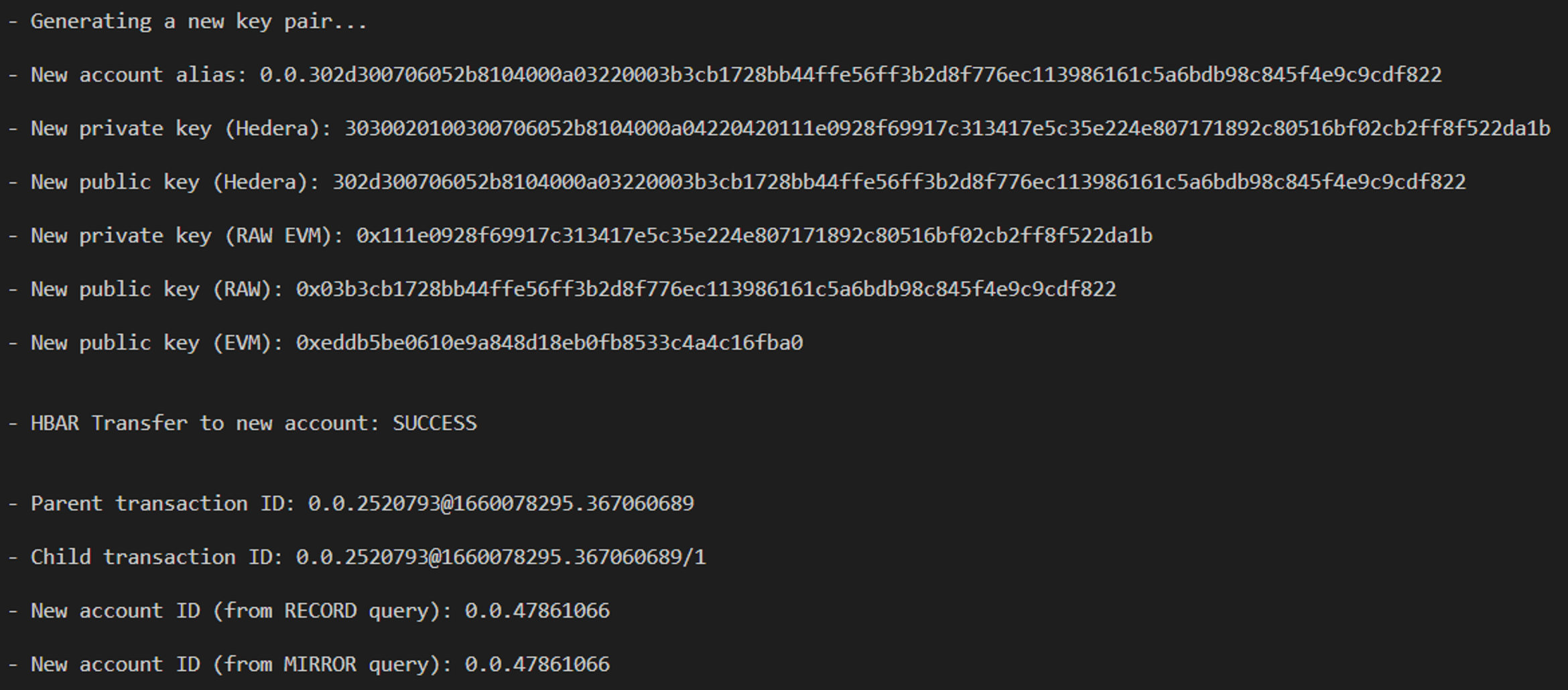 **IMPORTANT NOTE**: Private keys for Testnet are displayed here for educational purposes only. Never share your private key(s) with others, as that may result in lost funds, or loss of control over your account.
The next step is to deploy a smart contract using Truffle and the newly created Hedera account. Copy the value from “***New private key (RAW EVM)***” in the console output and paste it into the ***ETH\_PRIVATE\_KEY*** variable in the ***.env*** file (if you cloned the repository, you may need to rename the file from ***.env\_sample*** to ***.env***).
#### Helper Functions
The functions ***autoCreateAccountFcn()*** and ***mirrorQueryFcn()*** perform the auto account creation and mirror query, respectively.
```javascript theme={null}
async function autoCreateAccountFcn(
senderAccountId,
receiverAccountId,
hbarAmount
) {
//Transfer hbar to the account alias to auto-create account
const transferToAliasTx = new TransferTransaction()
.addHbarTransfer(senderAccountId, new Hbar(-hbarAmount))
.addHbarTransfer(receiverAccountId, new Hbar(hbarAmount))
.freezeWith(client);
const transferToAliasSign = await transferToAliasTx.sign(operatorKey);
const transferToAliasSubmit = await transferToAliasSign.execute(client);
const transferToAliasRx = await transferToAliasSubmit.getReceipt(client);
// Get a transaction record and query the record to get information about the account creation
const transferToAliasRec = await transferToAliasSubmit.getRecord(client);
const txRecordQuery = await new TransactionRecordQuery()
.setTransactionId(transferToAliasRec.transactionId)
.setIncludeChildren(true)
.execute(client);
return [transferToAliasRx, txRecordQuery];
}
```
```javascript theme={null}
async function mirrorQueryFcn(publicKey) {
// Query a mirror node for information about the account creation
await delay(10000); // Wait for 10 seconds before querying account id
const mirrorNodeUrl = "https://testnet.mirrornode.hedera.com/api/v1/";
const mQuery = await axios.get(
mirrorNodeUrl + "accounts?account.publickey=" + publicKey.toStringRaw()
);
return mQuery;
}
```
***
## Compile a Smart Contract Using Truffle
Now it’s time to compile ***SimpleStorage***, which is a basic smart contract that allows anyone to set and get data.
```solidity theme={null}
// SPDX-License-Identifier: MIT
pragma solidity >=0.4.22 <0.9.0;
contract SimpleStorage {
uint256 data;
function getData() external view returns (uint256) {
return data;
}
function setData(uint256 _data) external {
data = _data;
}
}
```
Use the following command to perform the compilation:
```javascript theme={null}
truffle compile
```
***Console Output:***
**IMPORTANT NOTE**: Private keys for Testnet are displayed here for educational purposes only. Never share your private key(s) with others, as that may result in lost funds, or loss of control over your account.
The next step is to deploy a smart contract using Truffle and the newly created Hedera account. Copy the value from “***New private key (RAW EVM)***” in the console output and paste it into the ***ETH\_PRIVATE\_KEY*** variable in the ***.env*** file (if you cloned the repository, you may need to rename the file from ***.env\_sample*** to ***.env***).
#### Helper Functions
The functions ***autoCreateAccountFcn()*** and ***mirrorQueryFcn()*** perform the auto account creation and mirror query, respectively.
```javascript theme={null}
async function autoCreateAccountFcn(
senderAccountId,
receiverAccountId,
hbarAmount
) {
//Transfer hbar to the account alias to auto-create account
const transferToAliasTx = new TransferTransaction()
.addHbarTransfer(senderAccountId, new Hbar(-hbarAmount))
.addHbarTransfer(receiverAccountId, new Hbar(hbarAmount))
.freezeWith(client);
const transferToAliasSign = await transferToAliasTx.sign(operatorKey);
const transferToAliasSubmit = await transferToAliasSign.execute(client);
const transferToAliasRx = await transferToAliasSubmit.getReceipt(client);
// Get a transaction record and query the record to get information about the account creation
const transferToAliasRec = await transferToAliasSubmit.getRecord(client);
const txRecordQuery = await new TransactionRecordQuery()
.setTransactionId(transferToAliasRec.transactionId)
.setIncludeChildren(true)
.execute(client);
return [transferToAliasRx, txRecordQuery];
}
```
```javascript theme={null}
async function mirrorQueryFcn(publicKey) {
// Query a mirror node for information about the account creation
await delay(10000); // Wait for 10 seconds before querying account id
const mirrorNodeUrl = "https://testnet.mirrornode.hedera.com/api/v1/";
const mQuery = await axios.get(
mirrorNodeUrl + "accounts?account.publickey=" + publicKey.toStringRaw()
);
return mQuery;
}
```
***
## Compile a Smart Contract Using Truffle
Now it’s time to compile ***SimpleStorage***, which is a basic smart contract that allows anyone to set and get data.
```solidity theme={null}
// SPDX-License-Identifier: MIT
pragma solidity >=0.4.22 <0.9.0;
contract SimpleStorage {
uint256 data;
function getData() external view returns (uint256) {
return data;
}
function setData(uint256 _data) external {
data = _data;
}
}
```
Use the following command to perform the compilation:
```javascript theme={null}
truffle compile
```
***Console Output:***
 ***
## Deploy the Smart Contract to Hedera Using Truffle
Finally, deploy the contract on Hedera through the JSON RPC Relay. Be sure to configure the following parameters in your ***.env*** file to be able to deploy to the Hedera testnet with Truffle.
```javascript theme={null}
NETWORK_ID = 296
JSON_RPC_RELAY_URL = https://testnet.hashio.io/api
ETH_PRIVATE_KEY = 0x7a9e... [Run create-account.js and paste value of “New private key (RAW EVM)”]
```
This example uses the [Hashio instance of the JSON RPC Relay](https://www.hashgraph.com/hashio/), hosted by [Hashgraph](https://www.hashgraph.com/). URLs are also available for the Hedera Mainnet and Previewnet.
Deploy the contract with the following command:
```javascript theme={null}
truffle migrate
```
***Console Output ✅***
***
## Deploy the Smart Contract to Hedera Using Truffle
Finally, deploy the contract on Hedera through the JSON RPC Relay. Be sure to configure the following parameters in your ***.env*** file to be able to deploy to the Hedera testnet with Truffle.
```javascript theme={null}
NETWORK_ID = 296
JSON_RPC_RELAY_URL = https://testnet.hashio.io/api
ETH_PRIVATE_KEY = 0x7a9e... [Run create-account.js and paste value of “New private key (RAW EVM)”]
```
This example uses the [Hashio instance of the JSON RPC Relay](https://www.hashgraph.com/hashio/), hosted by [Hashgraph](https://www.hashgraph.com/). URLs are also available for the Hedera Mainnet and Previewnet.
Deploy the contract with the following command:
```javascript theme={null}
truffle migrate
```
***Console Output ✅***
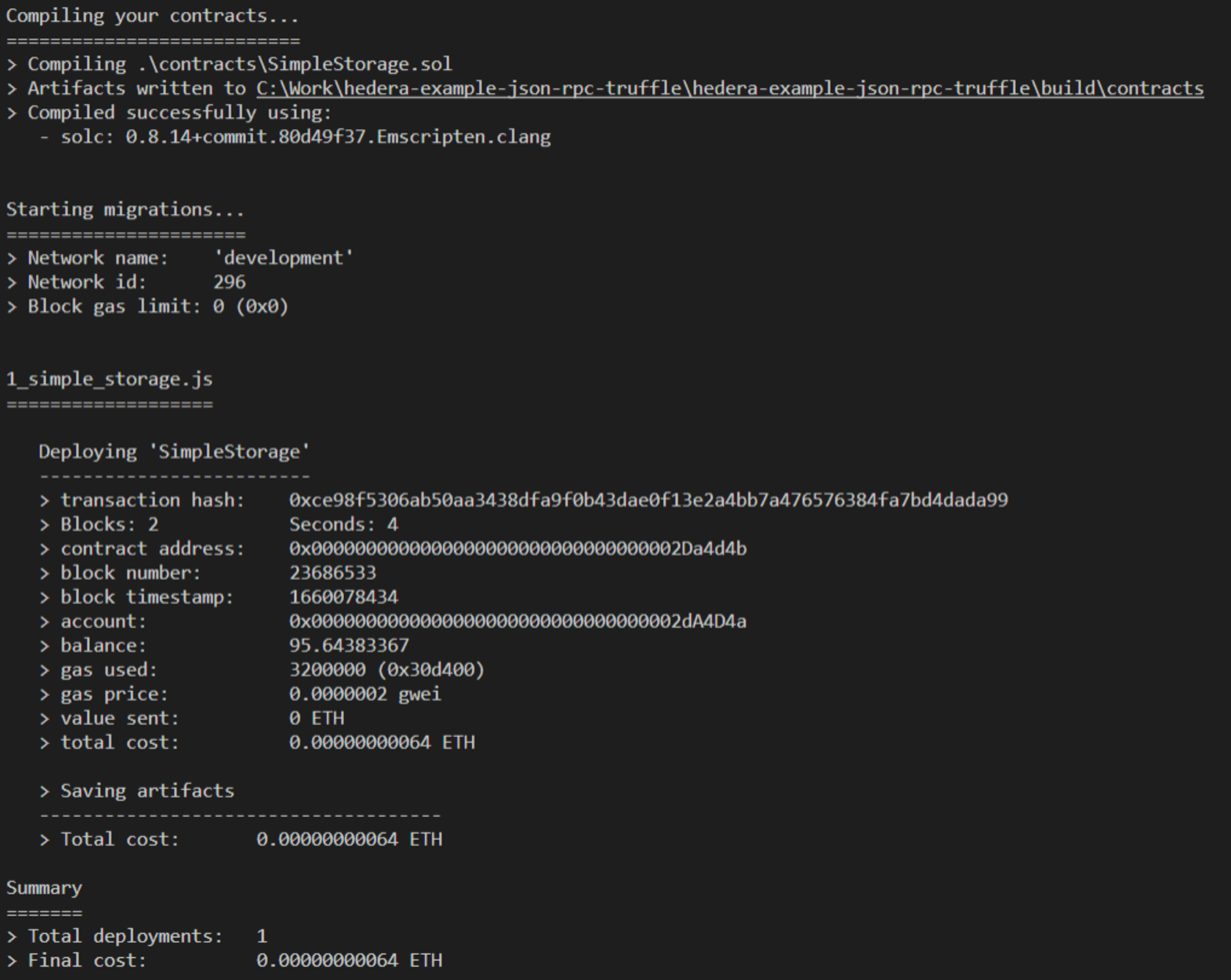 You can obtain more information about the newly deployed contract using the [mirror node REST API](/reference/rest-api). Additional context for that API is provided in [this blog post](https://hedera.com/blog/how-to-look-up-transaction-history-on-hedera-using-mirror-nodes-back-to-the-basics). Based on the console output of the example above, here are two mirror node queries that provide more information about the new contract and account based on their respective Solidity addresses:
[https://testnet.mirrornode.hedera.com/api/v1/contracts/0x0000000000000000000000000000000002Da4d4b](https://testnet.mirrornode.hedera.com/api/v1/contracts/0x0000000000000000000000000000000002Da4d4b)
[https://testnet.mirrornode.hedera.com/api/v1/accounts/0x0000000000000000000000000000000002dA4D4a](https://testnet.mirrornode.hedera.com/api/v1/accounts/0x0000000000000000000000000000000002dA4D4a)
Now you know how to deploy smart contracts on Hedera using Truffle and the JSON RPC Relay. The first part of this example used the Hedera [JavaScript SDK](/native/fundamentals#hedera-services-code-sdks). However, you can try this with the other officially supported SDKs for Java and Go.
***
## Additional Resources
**➡** [**Project Repository**](https://github.com/ed-marquez/hedera-example-json-rpc-truffle)
**➡** [**CodeSandbox**](https://codesandbox.io/s/hedera-example-json-rpc-truffle-q6kibt?file=/create-account.js)
**➡** [**Truffle Documentation**](https://trufflesuite.com/docs/)
**➡ Feel free to reach out in** [**Discord**](https://hedera.com/discord)
[GitHub](https://github.com/ed-marquez) |
[LinkedIn](https://www.linkedin.com/in/ed-marquez/)
[GitHub](https://github.com/theekrystallee) |
[X](https://X.com/theekrystallee) |
[Hashnode](https://hashnode.com/@theekrystallee)
You can obtain more information about the newly deployed contract using the [mirror node REST API](/reference/rest-api). Additional context for that API is provided in [this blog post](https://hedera.com/blog/how-to-look-up-transaction-history-on-hedera-using-mirror-nodes-back-to-the-basics). Based on the console output of the example above, here are two mirror node queries that provide more information about the new contract and account based on their respective Solidity addresses:
[https://testnet.mirrornode.hedera.com/api/v1/contracts/0x0000000000000000000000000000000002Da4d4b](https://testnet.mirrornode.hedera.com/api/v1/contracts/0x0000000000000000000000000000000002Da4d4b)
[https://testnet.mirrornode.hedera.com/api/v1/accounts/0x0000000000000000000000000000000002dA4D4a](https://testnet.mirrornode.hedera.com/api/v1/accounts/0x0000000000000000000000000000000002dA4D4a)
Now you know how to deploy smart contracts on Hedera using Truffle and the JSON RPC Relay. The first part of this example used the Hedera [JavaScript SDK](/native/fundamentals#hedera-services-code-sdks). However, you can try this with the other officially supported SDKs for Java and Go.
***
## Additional Resources
**➡** [**Project Repository**](https://github.com/ed-marquez/hedera-example-json-rpc-truffle)
**➡** [**CodeSandbox**](https://codesandbox.io/s/hedera-example-json-rpc-truffle-q6kibt?file=/create-account.js)
**➡** [**Truffle Documentation**](https://trufflesuite.com/docs/)
**➡ Feel free to reach out in** [**Discord**](https://hedera.com/discord)
[GitHub](https://github.com/ed-marquez) |
[LinkedIn](https://www.linkedin.com/in/ed-marquez/)
[GitHub](https://github.com/theekrystallee) |
[X](https://X.com/theekrystallee) |
[Hashnode](https://hashnode.com/@theekrystallee)